Shift Type Requirements
Requirements define staffing and who may work each staffed shift. Add coverage for the working shifts and dates you need. Preferred staffing and coefficients are optional refinements.
Real scenario example
The anonymized ward requires three senior nurses on N+ every day. It also
sets N to a minimum of 12 and a preferred level of 13 from All Nurses w/o
Students. Similar rules cover day and evening shifts. The preferred count is
the ward's desired staffing. The minimum is one lower to leave a narrow escape
when perfect coverage is impossible. A very large negative weight strongly
discourages that shortfall. This is a near-hard preference, not an ordinary
choice between 12 and 13. The three N+ senior slots are separate from, and
additional to, the 12–13 ordinary N slots.
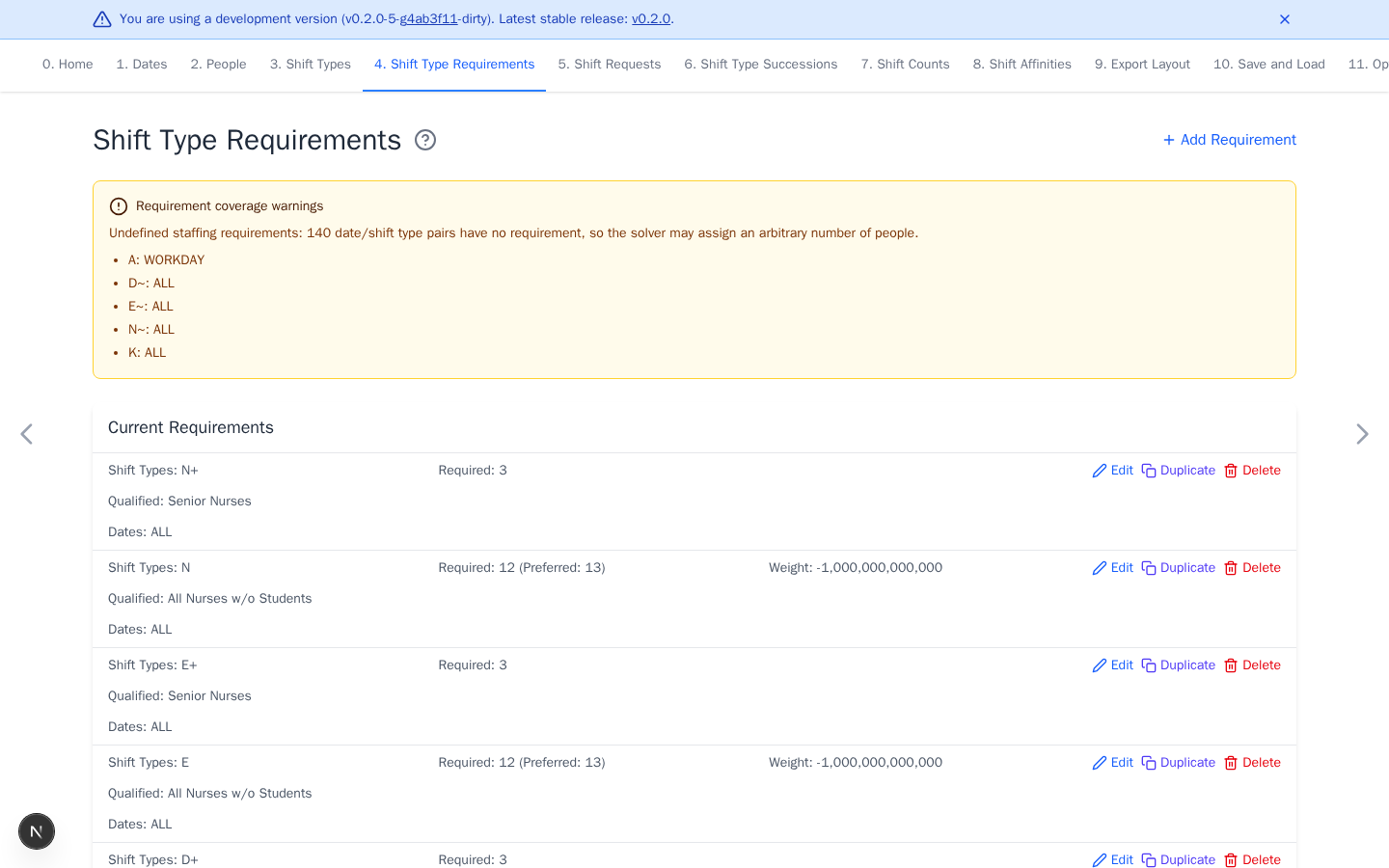
The current example warns about 140 date/shift-type pairs without fixed
staffing totals: A on workdays and D~, E~, N~, and K on all dates.
Review every warning. An undefined pair can receive an unexpected number of
assignments unless other rules control it.
Add coverage requirements
- Select Add Requirement.
- Select one shift type or group.
- Enter Required Number of People.
- Select Qualified People and Dates.
- Select Add.
Staffing behavior
- With no preferred value, required is an exact staffing level.
- With a preferred value, required is the hard minimum and preferred is the hard maximum. The weight penalizes the gap from preferred.
- Qualified People forbids everyone else from the selected shifts and
dates. Use
ALLwhen everyone is eligible. - A shift group has one aggregate total across its member shifts.
Refine staffing
Set Preferred Number of People and a negative weight when staffing may vary between a hard minimum and maximum. Leave it empty for an exact requirement. When the preferred level is effectively mandatory but a small shortfall must remain possible, set the minimum one below the preferred level and use a penalty that dominates ordinary preferences. Choose the actual headcount with the ward. The example's numbers are not universal targets.
Shift-type coefficients change how assignments contribute to that aggregate.
Leave them at 1 unless the workplace rule requires another contribution.
Do not define overlapping coefficients for a shift and a group containing it.
Resolve warnings
Add a requirement for every undefined date and working-shift pair. Review duplicate coverage and remove unintended overlap. Intentional layered requirements are valid, and the solver applies all of them.
Continue with Shift Requests or go directly to Optimize and Export.