Shift Requests
Requests record preferred or avoided assignments for people and dates. This page is optional. Skip it when the schedule has no individual preferences.
Real scenario example
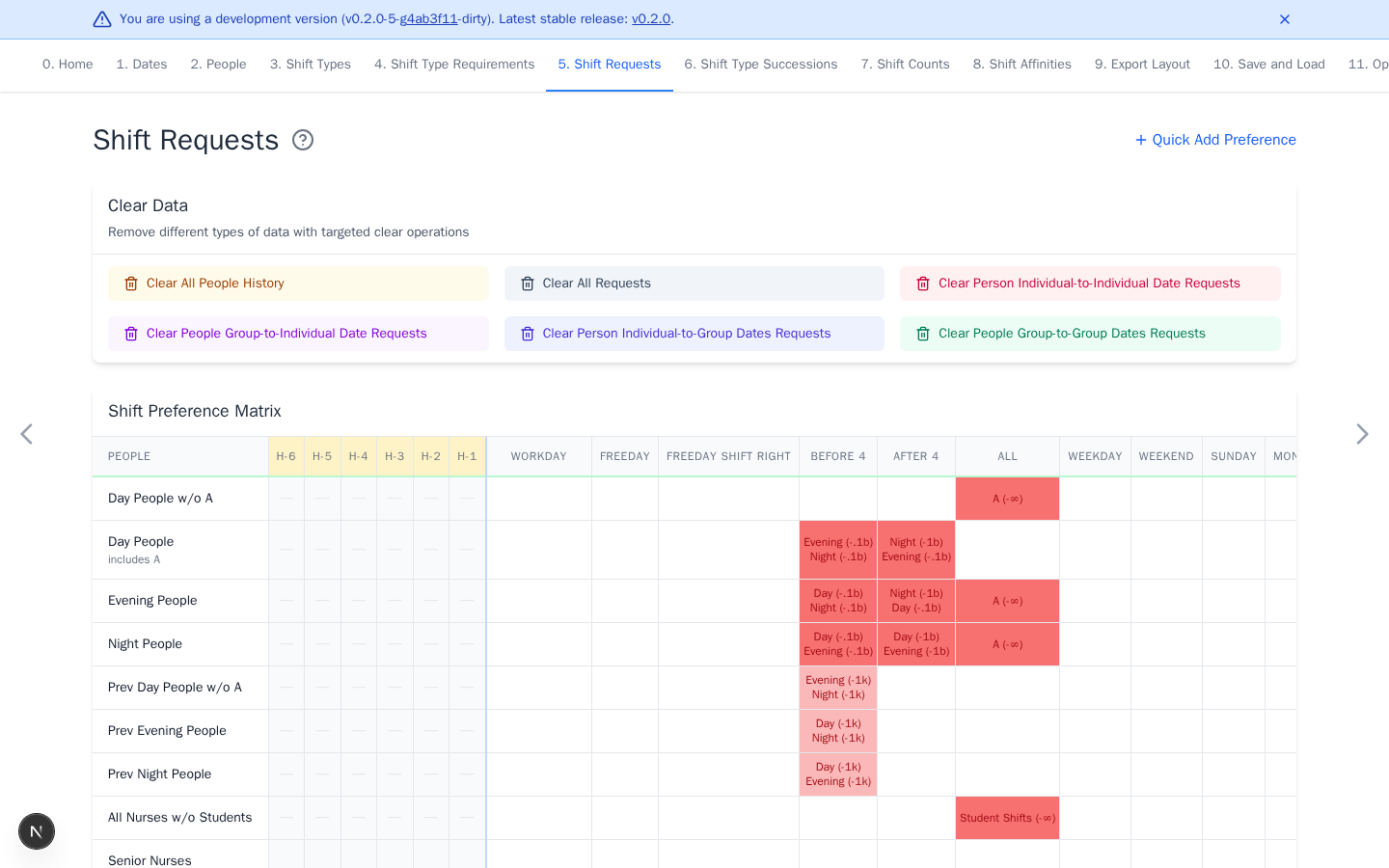
The anonymized ward uses group requests to keep day, evening, and night teams
on their usual shift families. Red cells show discouraged or forbidden work.
History columns H-1 through H-6 let succession rules cross into November.
Early-month cross-team requests have lower penalties while nurses transition
from the previous month's team. Some penalties increase from November 4.
Add requests
- Select a matrix cell to edit detailed requests.
- Select Quick Add Preference, choose shifts and a weight, then click or drag across cells for repeated entries.
- Positive weights prefer a shift. Negative weights avoid it.
- Green cells are positive, red are negative, and yellow contain both.
Use finite weights for normal priorities. A +∞ request should normally target
one concrete shift. On a multi-member group that does not cover every working
shift, it requires every member shift simultaneously and usually conflicts
with one shift per day. A group covering every working shift, including the
automatic ALL group, instead requires any non-OFF shift. A -∞ request on
a group forbids every member. Conflicting hard requests make the schedule
infeasible.
The real-schedule walkthrough imports individual requests in two empirical
tiers: 11000000000 for near-hard requests and 11000000 for strong soft
requests. Their relative order matters more than the exact digits. Confirm
how a ward marks request strengths in its workbook before assigning a tier.
Colors or a 1 can mean different things in different wards.
Add previous-shift history
Columns such as H-1 describe shifts immediately before the date range. They
let succession rules cross the schedule boundary.
Select a history cell to edit it.
Upload requests
Open Quick Add Preference and set the weight first. Upload one row per current person with no header. The first column is the exact person ID. Later columns match displayed dates and contain a shift ID or remain empty.
Every current person must appear exactly once. IDs must not contain commas. Upload is merge-only. Non-empty cells add or update the selected shift and weight. Blank cells do nothing. Clear existing requests first for replacement behavior.
For history upload, use one row per current person with no header. Columns are person ID, shift ID, and repetition count. The upload replaces each person's history.